Workspace
What it is for #
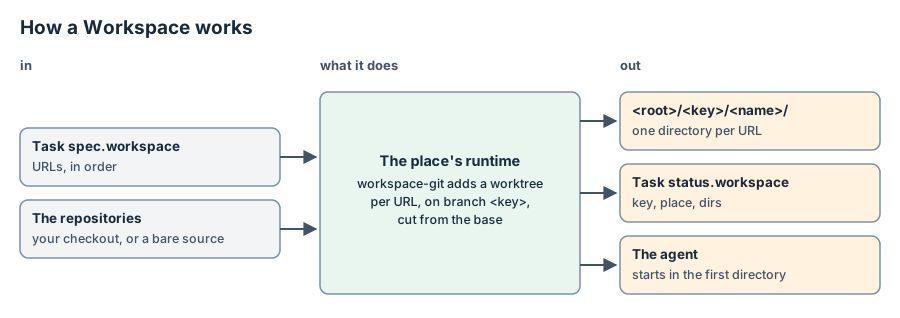
A Workspace is the set of directories that a Task's agent works in. It is
not a stored kind: a Task asks for it in spec.workspace, and
TaskController records it in status.workspace.
- What it is. One directory per URL in
spec.workspace, in the same order. The agent starts in the first directory. It can also read and write the others. - Who makes it. The runtime of the Task's place makes it, before the
session starts. A runtime can run a workspace provider for this
(two roles). For a git URL, the
shipped runtime,
runtime-mux, runs the shipped provider,workspace-git. That program adds a git worktree on a new branch. The branch name is the runtime's session key,<keyPrefix>.<task uid>forruntime-mux, unless the URL gives?branch=. The base is the URL's#fragment. Without a fragment, the base is the remote's default branch, as a fetch just before shows it. - Where it lives. On the place, under the runtime's root:
<root>/<key>/<repository name>/. Forruntime-muxthe default root is~/.local/share/runtime-mux/workspaces. - How a Task gets one. Each Task gets its own, under its own key. Two
Tasks never share a git worktree. Two Tasks can name the same
file://directory: the runtime uses that directory as it is. - When the Task finishes. A Concluded Task keeps its session and its workspace. Nothing is removed.
- When you delete the Task. TaskController releases the session, then
cleans the workspace.
workspace-gitcommits the changes that exist only in the worktree, untracked files included, torefs/fleet/preserved/<key>/<name>in the repository. Then it removes the worktree. The branch stays. A read-only directory in the worktree, such as a build's output, does not stop the removal:workspace-gitgives its owner write permission and removes it again. A removal can still stop part way, for example on a directory its owner cannot read. git then removes the worktree's git directory anyway, so the.gitthat is left, if any, names nothing. The next attempt removes the rest of the directory. It runs no git there, because the first attempt preserved the work already. A later make prunes preserved refs older thanpreserve.days(30 by default), and the branches of a bare source that the remote already has. It never deletes a branch of your checkout. - Multi-repo. Yes: give several URLs. Each one becomes a directory under the same key.
repository (your checkout, or a bare source of the remote)
   └── branch <keyPrefix>.<task uid>, cut from the base (#fragment or origin/HEAD)
          └── worktree  <root>/<key>/<name>/   ◀── the agent of the Task works here
When you write one #
You do not write a Workspace. You write its URLs in a Task's
spec.workspace. Write [] to let the agent start in the runtime's
default directory, with no workspace.
Example #
A Task that spans two repositories and a notes directory:
{
  "apiVersion": "fleet/v1alpha1",
  "kind": "Task",
  "metadata": {"name": "api-and-client"},
  "spec": {
    "harness": "claude-code",
    "host": "local",
    "brief": "Add the export endpoint and call it from the client.",
    "workspace": [
      "git+https://github.com/example/api.git#main",
      "git+https://github.com/example/client.git?branch=export-call",
      "file:///home/me/notes"
    ],
    "dispatch": false
  }
}
The agent starts in the api worktree. The client worktree is on the
branch export-call. /home/me/notes is used as it is.
Spec #
A Workspace has no spec of its own. spec.workspace of the Task is a list
of absolute URLs, <scheme>://…. Fleet checks that shape, and nothing else:
the runtime reads the scheme, the query and the fragment.
| URL | What workspace-git makes |
|---|---|
git+https://host/org/repo.git |
A worktree on a new branch, from the default branch. |
git+https://host/org/repo.git#v2 |
The same, from v2. |
git+ssh://git@host/org/repo.git?branch=feat-x#main |
A worktree on feat-x, made from main when it does not exist. |
git+file:///home/me/app?branch=feat-x#main |
A worktree of that checkout itself, on its own feat-x. |
git+file:///home/me/app#refs/fleet/preserved/<key>/app |
A worktree on work that an earlier release preserved. |
file:///home/me/notes |
Nothing: the directory, as it is. |
A remote URL gets a bare source of its own under <root>/.sources/. A
git+file URL to a local checkout gets a worktree of that checkout, so a
commit in the worktree is in the checkout at once. A branch that is already
checked out somewhere else gets <branch>-2, <branch>-3 and so on. The
runtime's manifest lists the schemes it handles. A Task with any other URL
waits with WorkspaceUnsupported.
Status #
TaskController is the only writer of status.workspace.
| Field | Meaning |
|---|---|
key |
The workspace key, the same as the session key. |
host |
The place whose runtime made it. |
dirs |
One directory per URL, in the Task's order. The session starts in the first. |
The field is absent for an empty list, until the runtime made the workspace, and after the clean.
Lifecycle #
Task dispatched ─▶ Materialize ─▶ Spawn ─▶ … ─▶ Concluded (kept)
                   (workspace)    (start in the first dir)
fleet delete ─▶ Release (stop) ─▶ CleanWorkspace (stop with release) ─▶ finalizer off
                                   preserve the work, remove the worktrees, keep branches
Materializeis the runtime'sworkspacecall, at most 3 attempts. A call with the same key answers the same directories, so a lost answer is settled by asking again.CleanWorkspaceis the runtime'sstopwithrelease. A clean is safe to repeat: it runs again after each wait, and three failures raiseNeedsAttention/CleanFailed.- A runtime never removes a
file://directory, and never deletes a branch on release.
Related kinds #
- A Task owns at most one Workspace, and its one Session runs in it.
- A Conversation on a route with a
{base}workspace gives each Task of the threadfile://<base>/<conversation name>. The manager makes that directory, and removes it when the thread retires. - Runtimes say how each runtime makes a workspace, and how to customize one.