Board resource
What it is for #
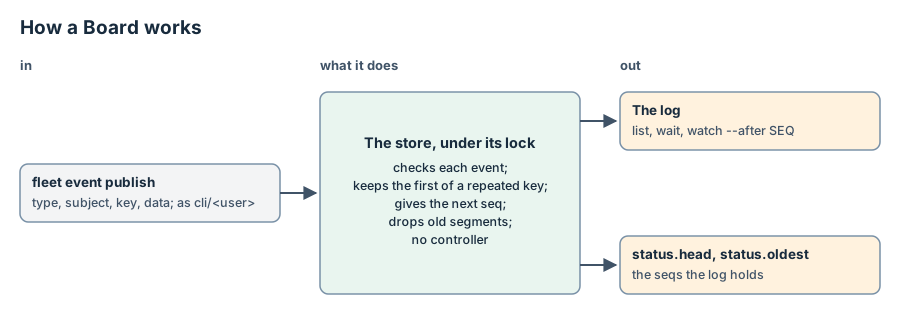
A Board is a log of events that every Task can read. A publisher adds an event, and each reader reads the events after a cursor. The inbox of a Task goes to one session. A Board is for everyone.
The events are not resources. The store keeps them in the Board's log, and only the store's typed append writes the log.
When you write one #
fleet init makes the Board shared, and fleet event uses it when you
give no --board. fleet init also makes the Board fleet, where
TaskController publishes Fleet's own events. See
Board fleet. Write a Board of your own when a group of events needs
other limits, or when its readers must not see other events.
Example #
{
  "apiVersion": "fleet/v1alpha1",
  "kind": "Board",
  "metadata": {"name": "ci"},
  "spec": {
    "retention": {"maxAgeSeconds": 86400, "maxCount": 1000},
    "maxDataBytes": 4096
  }
}
After fleet apply -f ci.json, publish an event and read it back:
fleet event publish --board ci --type ci.job.done --subject app/main --data '{"ok": true}'
fleet event list --board ci --type 'ci.*' --json
The first command prints ci/1 ci.job.done from cli/<user>. The second
prints the event with its seq, time and source.
Spec #
You write the spec with fleet apply. You can change it at any time. A
change applies from the next append.
| Field | Type | Required | Meaning |
|---|---|---|---|
retention.maxAgeSeconds |
integer, at least 1 | no | When someone publishes, the log drops each whole segment whose events are all older than this. The default is 604800 (7 days). |
retention.maxCount |
integer, 1 to 1000000 | no | When someone publishes, the log drops whole segments from the oldest until it holds at most this many events. The default is 10000. |
maxDataBytes |
integer, 1 to 1048576 | no | The most bytes of an event's data, as JSON. The default is 16384. |
Retention runs only when someone publishes to the Board, and it drops whole
segments. Until the next publish, a read can still show events that are
older than maxAgeSeconds.
The shared and fleet Boards that fleet init makes have the default
values.
Status #
Nobody writes the status with fleet apply or a controller. The store's
append writes it in the same write as the events.
| Field | Meaning |
|---|---|
head |
The seq of the last event. It is 0 before the first event. |
oldest |
The first seq that a reader can still get. It is head + 1 when the log is empty. |
A new Board has no status until its first event. Read that as head 0
and oldest 1.
Events #
Each event has these fields. Their names follow CloudEvents.
| Field | Set by | Meaning |
|---|---|---|
board |
Fleet | The Board's name. |
seq |
Fleet | The event's place in the Board's order, from 1. Each event gets the next number. |
time |
Fleet | When the store appended the event, in Unix milliseconds. |
source |
Fleet | Who published the event: cli/<user> for fleet event publish outside a session, the session's Task, {task, uid, lineage}, or controller/task-controller for Fleet's own events. See Publishing from a session and Board fleet. |
type |
The publisher | Segments of a-z, 0-9, _ and -, joined by dots, at most 128 characters. fleet. is reserved for Fleet's controllers. |
subject |
The publisher | Optional. What the event is about, at most 256 characters. |
key |
The publisher | Optional. At most 256 characters. See Lifecycle. |
correlation |
The publisher | Optional. An id for the events of one piece of work, at most 256 characters. |
data |
The publisher | Any JSON value, at most maxDataBytes bytes. |
The store refuses an event that breaks one of these rules, and appends nothing.
Publishing from a session #
Fleet gives each session an outbox. The outbox is a file beside the
session's signal file, on the same place. Fleet names it in
FLEET_EVENT_FILE.
session:  fleet event publish ──▶ outbox (one JSON line)
Fleet:    TaskController reads the outbox ──▶ append as the Task ──▶ status.outbox
- Inside a session,
fleet event publishchecks the event. It checks the Board's name, the type grammar, thefleet.prefix and the lengths. It does not open the store. - It appends one JSON line to the outbox and prints the line's offset,
for example
shared git.push queued at outbox offset 0. The Board does not have the event yet. - On each pass, TaskController reads the outbox of each Task that has a
session. It reads from the offset in
status.outbox. It reads only whole lines, at most 512 KiB per pass. It renews the lease before each read. AConcludedTask that is not being deleted has its outbox read only when the Task is due, as for its session recheck (every 5 minutes). - TaskController appends the events to their Board, under the lease. It
appends consecutive lines for one Board together, at most 256 at a
time. When the Board refuses such a batch, it appends those lines one
at a time, so that only the refused line is skipped. The
source is the Task:
{task, uid, lineage}. Then it writes the new offset tostatus.outbox. When another writer wrote the Task first, it reads the Task again and writes the offset again.
These rules apply:
- The source is always the Task whose outbox it is. A field in the line that names a source or another Task has no effect.
lineagelists the Task's ancestors, nearest first, from the parent labels (gateway.fleet.dev/parentand-uid). It is empty for a Task without a parent.fleet event list --source task/<name>keeps the events of one Task.- A line without a
keygets the keyoutbox-<generation>-<offset>. When TaskController reads the same line again, the Board appends nothing. - Delivery is at least once. If Fleet stops after the appends and before
it writes the offset, it reads those lines again. When retention already
dropped the key of such a line, because
maxCountis smaller than one read's lines, the Board appends that line again with a newseq. - When the outbox is shorter than the offset, the file was made again.
TaskController reads it from the start, and
generationgoes up by one. - A line has at most 64 KiB. A line without its newline waits for it.
- TaskController skips a longer line whole. When it skips the line before
its newline arrives, it sets
status.outbox.discardingand passes over the rest of the line up to that newline. The rest never becomes an event. - The outbox holds event payloads, so it is private. On Unix, Fleet and
fleet event publishmake it with mode 0600, and its directory with mode 0700. - TaskController skips a line that does not parse, or that the Board
refuses, such as a Board that does not exist. It counts it in
status.outbox.skippedand writes why instatus.outbox.lastSkipped. The next lines continue. An outbox made again clearslastSkipped. - When the session is
Gone, TaskController reads its outbox until one read finds no whole line left. Then it setsstatus.outbox.closedand reads that outbox no more, unless the Task is being deleted. When the session runs again,closedgoes. - When TaskController cannot read the outbox, the offset stays. It concludes nothing.
- A deleted Task keeps its finalizer after the release until its outbox holds no whole line still to ingest. The release stops the session first, so no line comes after the last read.
- While lines are still to ingest, the
Releasedcondition isFalse/OutboxDraining, with no time limit. - While the outbox cannot be read, the condition is
Unknown/OutboxUnread. This lasts at most 5 minutes from the first pass that could not read it. A pass that reads it starts that time again. Then Fleet gives up the unread lines, and the release ends withReleased=True/OutboxGivenUp. This happens on a place withoutfleeton itsPATH, with afleetolder than this release, or whereexecfails. - A session that has
FLEET_SIGNAL_FILEbut noFLEET_EVENT_FILErefuses to publish. It never publishes ascli/<user>.
Waiting for the seq #
A session that needs the event's seq publishes with --wait:
fleet event publish --type git.push --data '{"branch": "main"}' --wait --timeout-ms 30000
fleet event publishfinds the session's key in the name ofFLEET_EVENT_FILE. It refuses a name that Fleet did not make, and then appends nothing.- It reads the store, with no lock. It finds the Task whose session has
that key. The line does not name the Task. It keeps the Task's
status.outboxand the head of the Board. - It appends the line, as without
--wait. - It reads the Task again every 200 ms. It waits until
status.outboxis past the line's end, in the generation that reads the line. When the line starts below the keptoffset, the outbox was made again: that generation is the kept one plus 1. Otherwise it is the kept one. - Then it looks for the event. The event's source is that Task. Its key
is the line's key, or
outbox-<generation>-<offset>. - It prints the event with its
seq, as a publish outside a session does, and exits 0.
These rules apply:
- When
status.outbox.lastSkippednames the line's offset in the line's generation, Fleet skipped the line. The command prints that reason and exits 1, even when the Task used the line's key before. - TaskController appends an event before it moves
status.outboxpast its line. When the Board has no event for the line after that, the line is not on the Board: Fleet skipped it, retention dropped its event, or the outbox was made again. The command says that the line was skipped or is not on the Board, and exits 1. - When the Task used the line's key before, the Board keeps the first
event. The command prints that event with
(already published under this key). When the Board was deleted and made again after the command read it, every event on it is new. - When a read of the store fails for a moment (
BusyorUnknown), the command prints a warning and reads again at the next poll. - When the time ends first, the command prints the queued line with its offset, and exits 7. Fleet has not read the line in yet. It can still do so, unless the outbox was made again.
- The command opens the store through
--config,FLEET_CONFIGor the per-user config, asfleet event listdoes. A place without Fleet's config cannot wait. Then it appends nothing. - Outside a session, a publish is done when it prints. There,
--waitchanges nothing.
Reading #
A reader keeps a cursor: the seq of the last event it read. It reads the
events after it, and the cursor then moves to the last seq it got.
| Command | Does |
|---|---|
fleet event list --after SEQ |
Prints the matching events after SEQ that the log holds now, and exits. |
fleet event wait --after SEQ --timeout-ms MS |
Prints the matching events after SEQ as list does. When there are none, it reads again every --poll-ms until one comes. When none comes before the time ends, it prints nothing and exits 7. |
fleet event watch --after SEQ |
Prints each matching event after SEQ, oldest first, then each new one as it comes. It stops when its standard output closes. |
These rules apply:
- All three take the same filters. See Commands.
waitandwatchread the Board every--poll-ms, 500 by default. They take no lock.watchprints no event twice and passes none. When the log gets new events during a read, the next read gets them.watch --jsonprints one event per line, as compact JSON (NDJSON). Without--json, it prints one line per event, in the columns oflist.watchlearns that its reader went away when it prints the next event. Then it exits 0.- Each event that
waitandwatchprint has itsseq. That is the next cursor. - When a read fails for a moment (
BusyorUnknown),waitandwatchprint a warning and read again at the next poll.waitstill stops at its timeout. - When the cursor is older than the log, all three exit 5 and name
oldestand the cursor they were at. With--json, they also print{"expired": {"oldest": N}}.
Subscriptions #
A Task can subscribe to a Board. Then its session hears of new events in
its inbox, as one notice per subscription. A notice never holds the events.
The session reads them with fleet event list.
fleet event subscribe build --board ci --type 'ci.*'
fleet event unsubscribe build --board ci --type 'ci.*'
A subscription is an item of the Task's spec.subscriptions: a board, a
filter and an optional after. The filter takes the keys type,
subject, source and correlation, with the meanings of the list
flags. fleet apply can also set the list. See
Task.
TaskController keeps one cursor per subscription in the Task's
status.subscriptions. On each pass, for each subscription, it does these
steps:
- It finds the cursor. A new subscription starts at its
after. Withoutafter, it starts at the Board's head. A Board that is not there yet, or that was made again, is read from its first event. - When the last notice of the subscription is still in the inbox, it
stops. The next notice then covers all the events since. It also stops
when the Board's
status.headis not above the cursor. A Board with no event yet has nostatus.head, and counts as head 0. - It reads the events after the cursor, up to the head and at most 10000. The cursor moves past each event it reads. Fleet renews its lease before each page of 1000 events.
- When events match, or the cursor was older than the log, it queues one notice. The notice and the cursors go in one write, under the lease.
A notice is an inbox entry from board/<board>. Its notice field holds
the Board, the count of matching events, the first and last matching
seq, and expiredBefore when the cursor was older than the log. Its text
gives the fleet event list command that reads the events:
2 new events on Board ci match your subscription, seq 41 to 44. Read them with: fleet event list --board ci --after 40 --type='ci.*'
These rules apply:
- Delivery is at least once. The session can read an event in a notice and
again in the next one. The
seqtells it which events it has. - A subscription has at most one notice still to deliver. The notices of all subscriptions also count against the inbox bound. When the inbox is full, the subscriptions wait.
- When the cursor is older than the log, the notice says which events
expired. The cursor then goes on from
oldest - 1. Fleet never passes over events without a notice. - When the Board cannot be read (
Unknown), the cursor and the notice stay as they are. The pass reports why. - A Concluded or Releasing Task, and a Task that is being deleted, gets no notice. Its cursors wait.
countis what the pass found. A laterlistalso prints the events published after the notice.
Board fleet #
TaskController publishes events about each Task to the Board fleet. Use
them to follow the work of all Tasks from one place.
fleet event list --board fleet --type 'fleet.task.*'
fleet event subscribe lead --board fleet --type fleet.task.result
Each event has these values:
| Field | Value |
|---|---|
source |
controller/task-controller |
subject |
The Task's name |
key |
task/<uid>/<series>/<n>. See the table below. The key names the Task by its uid only, so that it stays within 256 characters for the longest name. |
| Type | When | data |
Key series and n |
|---|---|---|---|
fleet.task.phase |
The phase of the Task changes. | from and to, the phases before and after. reason, the reason of a condition that the same write changed: the condition of the new phase, else the first. A change with no changed condition has no reason. |
phase, the number of the change in the Task's life, from 1 |
fleet.task.declared |
The worker declared a fact with fleet declare, and TaskController saw it. |
index, the place of the fact in status.declared, from 0. declaration, the fact. A fact larger than 4096 bytes as JSON has only its kind, cut to 256 characters, and truncated is true. |
declared, the index |
fleet.task.result |
The worker recorded a result with fleet result, and TaskController saw it. |
generation, outcome and summary. A summary longer than 1024 characters is cut to 1024, and summaryTruncated is true. The outputs and the artifacts are not in the event. |
result, the generation |
TaskController does these steps:
- A reconcile that changes the phase adds the phase event to
status.fleetEvents.pending. It does this in the same write that changes the phase. The intent to publish is then in the store with its cause. - After that write, the manager appends the events that the Task is owed
to the Board
fleet, under the lease. These are the pending phase events, one event for each declaration afterstatus.fleetEvents.declared, and one event for a result whose generation is notstatus.fleetEvents.result. - Then the manager writes
status.fleetEvents:pendingis empty, anddeclaredandresultmove to what it appended. - At the start of each Task's turn in each pass, the manager does steps 2 and 3 again. This publishes the declarations and the results, and the events that a stopped pass did not publish.
These rules apply:
- Only a controller publishes a type that starts with
fleet.. The store refuses it fromcli/<user>and from a session's Task. - Delivery is at least once. When Fleet stops after the append and before
the write of
status.fleetEvents, the next pass appends the same events again. Their keys append nothing. - When the Board cannot be written (
Unknown),status.fleetEventsstays. The next pass tries again. The pass reports why. - When the Board refuses an event, such as when the Board
fleetdoes not exist or itsmaxDataBytesis too small, TaskController skips that event. It counts it instatus.fleetEvents.skippedand writes its key and why inlastSkipped. A skipped event is not published again. Runfleet initto make a missing Boardfleet. pendingholds at most 64 phase events. A new one past 64 drops the oldest. A gap in the numbers of the phase keys shows a dropped event.- A Task that a release removes in one pass still publishes its change to
Releasing: the manager appends it before it removes the finalizer. - A result replaces the result of an older generation. When two results come between two passes, only the newer one gets an event.
- A Task from before this release has no
status.fleetEvents. Its past declarations and its result get no event. On its first pass, TaskController writesstatus.fleetEventsfrom what the status holds, withstartedset, also when the Task has no declaration and no result. Then it publishes only what comes after.
Lifecycle #
publish ──▶ check ──▶ drop aged segments ──▶ key held? ──yes──▶ answer the first event
                                                │
                                                no
                                                ▼
                    next seq, append ──▶ drop past maxCount ──▶ status.head, oldest
- The log is a series of segments. Each segment holds a tenth of
maxCountevents, at least 1 and at most 1000. - Each publish first drops, from the oldest, each segment whose events are
all older than
maxAgeSeconds. This can drop every segment. Theseqdoes not go back: the next event getsstatus.head + 1. - Then the store looks for keys. A publish with a
keythat the samesourceused before, on an event that the log still holds, appends nothing. The publisher gets the first event back. A retry is then safe. A key whose event the log dropped can be used again. - After the append, the store drops the oldest segment while the log holds
more than
maxCountevents. The segment with the newest event stays. fleet event listreads up to the lastseqin the log when it starts. It does not stop atstatus.head, because a crash can leave the log ahead of the status. An event that someone publishes during the list is in the next list.- A reader keeps its own cursor: the last
seqit read. When the log no longer holds the event after the cursor, the read answersExpiredwitholdest.fleet event list,waitandwatchthen exit 5. The reader can continue fromoldest - 1, and it knows that it missed events. - A Board has no finalizer. A delete removes the Board and its log at
once. A new Board with the same name starts at
seq1.
Related kinds #
- A Task's session publishes through its outbox, and
TaskController appends the events as the Task. People and scripts
outside a session publish as
cli/<user>. TaskController publishes each Task's phase changes, declarations and results to the Boardfleetascontroller/task-controller. - The Task inbox is different: it delivers each entry to one session. A Board reaches the inbox only through a subscription, as one notice.
Commands #
fleet apply -f ci.json
fleet get board ci
fleet list boards
fleet event publish --board ci --type ci.job.done --key run-42 --data '{"ok": true}'
fleet event list --board ci --after 10 --type 'ci.*' --limit 50
fleet event wait --board ci --after 10 --type 'ci.*' --timeout-ms 60000 --json
fleet event watch --board ci --after 10 --json
fleet event subscribe build --board ci --type 'ci.*' --after 10
fleet event unsubscribe build --board ci --type 'ci.*'
fleet delete board ci
fleet event list, wait and watch take these filters. A value that ends
in * matches a prefix. watch takes no --limit.
| Flag | Keeps |
|---|---|
--after SEQ |
Events with a seq above SEQ. The default is 0 for list. wait and watch need it. |
--type T |
Events of type T. |
--subject S |
Events about S. |
--source S |
Events from S, such as cli/alex, task/build or controller/task-controller. |
--correlation C |
Events with the correlation id C. |
--limit N |
The first N events that match, 1 to 10000. The default is 100. |